Author: Charles

  • How does TypeBox report errors when validation fails?

    How does TypeBox report errors when validation fails?

    TypeBox does not answer a failed check with a bare “invalid”. TypeBox validation errors are structured records: for every problem found, they describe which rule failed, where in the data the offending value sits, and what the problem is in plain words. Your application reads those records and decides what to do with them.

    This design treats failure as information rather than as an exception. Nothing is thrown at you, and a check can report a single error or a whole list, because a payload is often wrong in more than one place at once. Developers working with TypeBox typically iterate over these entries — often called ValueErrors — and turn them into log lines, test assertions, or messages shown to users.

    This article looks at what information an error carries and how errors pinpoint the exact field that failed. It also covers reading several errors from one check, turning raw entries into feedback people can act on, and why this detail pays off during development and debugging.

    What Information a Validation Error Carries

    Each error entry describes a failed expectation. It identifies the kind of check that failed — a value of the wrong type, a required property that is absent, a number below its permitted minimum — together with a human-readable message summarising the problem.

    The entries are data, not drama. They arrive as a collection your code can iterate, count, filter, and format however it likes. That stands in contrast to a single opaque string or a thrown exception: validation failure is expected control flow, and the results are yours to present.

    Context That Shows the Actual Mismatch

    Entries can also carry context, such as the value that failed and the part of the schema it failed against. During debugging that context is gold, because it shows the mismatch rather than merely announcing it. Do treat logged values with care when payloads contain personal or sensitive data.

    Multiplicity is part of the design. Errors are produced as a sequence you can walk through, reflecting the fact that one pass can find many problems. A simple pass-or-fail check discards all of that; the error-reporting route keeps it available.

    A Small, Stable Vocabulary of Failure Kinds

    The failure kinds come from a small, stable vocabulary: wrong type, missing required property, failed format, value out of range, and a handful of others. That stability matters, because it lets programs switch on the kind of problem rather than parsing message sentences. Messages are for humans; kinds and paths are for code.

    How Errors Point to the Exact Field That Failed

    Every error carries a location, expressed as a path through the data. For a top-level field it is the property name; for nested objects it is the chain of properties leading down, like the postcode inside a delivery address. For arrays it includes the position of the offending item.

    That precision is what makes errors actionable. Told only that a field is invalid in a forty-field payload, a user faces a guessing game. Given the exact field and the rule it broke, a form can highlight one input and an API consumer can find one member to fix.

    Reading the Path Together With the Rule

    The path and the rule work as a pair, and the pair differs by failure kind. A missing-required error points at the object that is incomplete and names the property that should be there. A wrong-type error points at the value itself, and reading both parts tells you what happened, and where.

    Sometimes the failure sits at the very top, when the whole payload has the wrong shape — an array where an object was expected, for instance. Then the path is the root and the message describes the overall mismatch. Interfaces usually surface that as a general error rather than attaching it to a field.

    Why Array Positions Matter in Bulk Imports

    Array positions earn their keep during bulk work. When an imported file contains five hundred records and the two-hundred-and-twentieth has a faulty quantity, a path naming that exact item turns an afternoon of hunting into a thirty-second fix. Batch tooling lives or dies on this detail.

    Reading Several Errors From One Failed Check

    A single submission can fail in many places at once: a wrong type here, a missing required field there, a broken constraint somewhere else. Collecting the full list in one pass spares users the miserable loop of fixing one error, resubmitting, and discovering the next.

    You are not obliged to read them all. Iteration is under your control, so simple clients can stop at the first error while thorough tooling gathers everything. Reading every error does mean the validator keeps walking after each failure, and how much work that involves relates to the runtime cost of running validation on your payloads.

    Tidying a Long Error List for Presentation

    Presentation usually needs some tidying. Grouping errors by field, and keeping the first error per field, works well because later entries often repeat the same root problem in different words. Cascades — where one wrong type triggers follow-on complaints — can be folded away once the primary failure is shown.

    Different audiences want different depths. End users benefit from a short, complete list they can fix in a single pass. Logs, tests, and integration partners generally prefer the unabridged set, because their job is diagnosis rather than data entry.

    Predictable Ordering Makes Errors Testable

    Ordering tends to follow the shape of the data itself, which makes error lists predictable from one run to the next. Predictability sounds dull, but it is what allows tests to compare expected and actual errors without flaky results. It also means the first error a user sees is usually the first problem in their payload, which matches how people scan a form.

    Turning Raw Errors into Messages Users Can Act On

    Raw error messages are written for developers, and users deserve better than being told a value must be a string at some abstract path. A mapping layer between the two is normal, expected work. It is how professional products turn validation machinery into comprehensible feedback.

    The mapping uses the two stable parts of every error. The path finds the field and its friendly label, while the kind of failure picks the phrasing. Missing becomes “please provide”, a format problem becomes “check the format of”, and a length problem states the expectation in ordinary words.

    Translation and Safe Detail Levels for APIs

    Those same keys make translation practical. Because paths and failure kinds are stable, they can look up templates in each supported language. That is far more reliable than trying to translate finished sentences after the fact.

    For APIs, return a structured list — which field, what problem — with an appropriate failure status, instead of dumping raw entries into a response. Be deliberate about the level of detail as well. Public-facing errors should not leak internal schema structure or echo sensitive submitted values back, while authenticated integrator tooling can reasonably show more.

    Consistency and Placement in Forms

    Consistency compounds the benefit. When every form and endpoint maps errors the same way, feedback feels predictable. Users learn to trust it, and to act on it quickly.

    In forms, placement does half the persuading. Messages belong beside the fields they describe, shown after a submission attempt rather than while someone is still typing, with a summary that lets users jump to each problem. Keeping the values the user already entered, so a rejection never wipes their work, matters as much as the wording.

    Why Error Detail Matters During Development and Debugging

    Development constantly raises one question: is the payload wrong, or is the schema wrong? A precise path and rule usually settle it in seconds. A bare pass-or-fail verdict invites guesswork, temporary logging, and slow print-driven debugging instead.

    Tests gain the same precision. Asserting on the paths and kinds of errors, not merely on the fact of failure, turns tests into documentation of the contract. They also catch regressions where the wrong rule starts rejecting good data after a schema change.

    Structured Errors as Production Evidence

    In production, structured errors become evidence. Logs reveal which clients send bad data, which rules reject most often, and where documentation or client libraries are misleading people. That evidence guides schema fixes, better examples, and targeted support articles.

    The cost of throwing detail away is paid repeatedly in support tickets and slow investigations. Keeping it costs little, because the errors are produced whether you use them or not. The craft lies in not collapsing a rich report into the single word “invalid”.

    Fixing the Documentation Behind Repeat Errors

    Partners and client libraries close the loop. When the same few error kinds keep arriving from one integration, the problem is usually an ambiguous example or a misleading field description rather than carelessness. Fixing the documentation at that point removes a whole category of future failures, something no amount of error handling could achieve.

    Frequently Asked Questions

    Does TypeBox throw an exception when validation fails?

    No. Failure is reported as error entries that your code can inspect and iterate. Whether to throw, log, or respond is a decision your application makes afterwards.

    Can I show only the first error instead of all of them?

    Yes. Iteration stops whenever you stop reading, so simple interfaces can take the first entry and ignore the rest. Forms and logs usually benefit from collecting everything.

    Can error messages be translated into other languages?

    Yes. Use each error’s path and failure kind as keys into your own translated templates. That is much more dependable than translating finished message text.

    Do validation errors include the bad value itself?

    They can include the offending value as debugging context. Treat it carefully in logs and responses, especially when payloads contain personal data.

    Conclusion

    A TypeBox validation failure is a report rather than a dead end: structured entries say which rule failed, exactly where, and why, for every problem found in a single pass. Add a thin mapping layer and those entries become clear user feedback, precise test assertions, and logs that genuinely explain production rejections. The detail is already there; the craft is in using it instead of collapsing it into “invalid”.


  • What happens when an optional TypeBox property is missing?

    What happens when an optional TypeBox property is missing?

    Nothing goes wrong. When an optional property is missing, validation simply passes, because TypeBox optional properties are allowed to be absent. The validator skips the missing field entirely, the object is accepted as it stands, and only a missing required property would produce an error.

    That simple answer hides a few details worth understanding, because optional is easily confused with neighbouring ideas. An absent optional field is not filled in with a default value, it does not turn into an empty value, and it is not the same thing as permitting a null. The TypeScript type generated from the schema also records that the property may not be there, so code reading the object is pushed to handle both possibilities.

    This article covers how a property comes to be marked optional in a schema built with TypeBox. It explains what validation does when the property is absent, how the absence appears in your types, how missing differs from empty or explicitly unset values, and how to mix optional and required properties sensibly.

    How a Property Is Marked Optional in a Schema

    Every declared property in an object schema starts out required. An object that lacks any one of them fails validation, because the schema is read as a contract about exactly what an object must contain.

    The Optional modifier changes the deal for one property at a time. Wrapping a property’s schema with it declares that the property may be omitted; in effect, the property leaves the schema’s required list while keeping every other rule attached to it. Its neighbours are untouched, so optionality is precise rather than contagious.

    Marking Every Property Optional at Once

    There is also a whole-object variation. A partial version of a schema marks every property optional at once, which is exactly what update-style payloads usually want. Per-property marking suits objects you are designing, while the partial transformation suits objects you are reusing for a different job.

    One distinction is worth fixing early. Optionality governs presence only: it says whether the property must appear. What values are acceptable when it does appear remains entirely the business of the property’s own schema.

    Optional Markers Double as Documentation

    Optionality recorded in the schema doubles as documentation. Because the marker is machine-readable, generated API documentation and client tools can show which fields may be skipped. Consumers of the API learn the contract from the schema itself instead of from guesswork or support tickets.

    What Validation Does When the Property Is Absent

    Validating an object involves two kinds of checks. The validator confirms that every required property is present and valid, and it checks any optional property that happens to be present against its rules. An absent optional property has nothing to check, so it is passed over without comment.

    Presence changes everything, though. If the property does appear, it is validated exactly as strictly as a required one. A wrong type or a broken constraint fails the whole check, because optional is permission to be absent, not permission to be anything at all.

    Absent Optional Versus Missing Required

    The contrast with a missing required property is stark. That absence fails validation immediately, with an error identifying the field that should have been there. One kind of absence is part of the contract; the other is a breach of it.

    Finally, validation inspects data but never modifies it. The object that passes is the object that arrived: no key is added carrying an empty or undefined value. Downstream code sees precisely what the sender sent, nothing more.

    The Same Rule Inside Nested Objects and Arrays

    The same behaviour repeats at every level of the data. An optional property inside a nested object is skipped when absent, exactly as at the top level. Objects inside arrays follow the identical rule, item by item, so there are no special cases to memorise.

    How an Absent Optional Property Shows Up in the TypeScript Type

    The static type generated from the schema marks the property as optional too. Reading it can therefore produce either the expected value or nothing at all, and TypeScript insists that consuming code cope with both outcomes before using the value.

    In practice, this means a presence check or a fallback wherever the field is used. Teams occasionally find that friction annoying, but it is the system working as intended. A field the API is allowed to omit can never be treated as guaranteed by accident.

    One Schema Keeps Types and Validation in Step

    The deeper benefit is that the two views cannot drift apart. One schema produces both the runtime check and the compile-time type, so changing a property from required to optional updates validation and types together. There is no separate type definition waiting to be forgotten.

    That coupling also guides schema evolution. When a property flips from required to optional, type errors appear at every place the code assumed its presence, marking the spots that need a second look. The compiler produces the migration checklist for free.

    The Difference Between Missing, Empty, and Explicitly Unset Values

    Three states are confused constantly, and they behave very differently. A property can be missing entirely, present with an empty value such as an empty string or a zero, or present while carrying an explicitly unset marker like undefined or null.

    Empty is a real value and is judged as one. An optional text field that arrives empty still faces its constraints, so a minimum-length rule will reject the empty string even though omitting the field altogether would have passed. Clients that send blank fields instead of leaving them out meet failures they did not expect.

    Undefined and Null Behave Differently Again

    Undefined occupies a grey area. JSON has no undefined value, so serialised payloads simply drop such keys, and present-but-undefined usually becomes plain missing by the time an API receives it. Data held in memory can carry undefined, and there it is generally treated like absence.

    Null is different again, because it is a genuine JSON value that gets checked like any other. It will fail a string schema unless the schema deliberately allows null among the permitted kinds of value. If your API uses null as a “clear this field” signal, that permission has to be granted explicitly; optionality does not grant it.

    Why Forms Make the Empty Case So Common

    Everyday clients make the empty case common. Web forms, for example, submit an empty string for every field the user left untouched, so APIs routinely receive present-but-empty values where the sender meant nothing to say. Deciding whether to trim such values into absence, or reject them, is a deliberate design choice worth making once and documenting.

    Mixing Optional and Required Properties in One Object

    Real objects almost always mix the two. An account cannot function without an email address and a password, so those are required. A display name, an avatar, and a preferred timezone are refinements, so they are natural candidates for optional.

    The working rule is to ask what the feature breaks without. If the answer is “everything”, the property is required; if the answer is “nothing important”, it is optional. Schemas that follow the rule state the real minimum a feature needs, and validation becomes meaningful again.

    The Trap of Marking Everything Optional

    The opposite habit is the trap. Marking everything optional makes validation guarantee almost nothing, and the cost reappears as absence checks scattered through every corner of the codebase. Generous optionality feels flexible and quietly taxes everything downstream.

    Creation and update payloads often want different mixtures. A creation schema is strict, while an update schema frequently wants the partial, all-optional variant with unchanged per-field rules. Deriving both from one source schema keeps them consistent instead of maintaining two definitions by hand.

    Defaults, Extra Fields, and Schema Evolution

    Optionality also interacts with how undeclared fields are treated, which is a separate decision covered in how extra properties are handled by a schema. Settling both questions together produces an object contract with no surprises. And if a missing optional field should behave as though it had a standard value, apply that default in application code after validation; the schema alone will not supply it.

    Evolution cuts in one safe direction. Relaxing a required property to optional never breaks existing senders, because everything they used to send still passes. Tightening an optional property to required does the opposite, silently invalidating clients that omit it, so it should be treated as a breaking change.

    Frequently Asked Questions

    Does a missing optional property ever cause a validation error?

    No. Absence is exactly what optional permits, so the field is skipped. Errors arise from missing required properties, or from properties that are present but break their rules.

    Is an optional property the same as one that allows null?

    No. Optional concerns whether the property appears at all. Null is a present value, and it must be allowed in its own right if you want it accepted.

    Will validation fill in a default when the field is missing?

    No. Validation only checks the data it receives and leaves that data unchanged. Applying defaults afterwards is a small, deliberate step in your own code.

    Can I make all properties optional for update requests?

    Yes. A partial variant of the schema does exactly that, keeping every field’s rules intact for whichever fields a client chooses to send.

    Conclusion

    A missing optional property is the quietest outcome in validation: the check passes, nothing is added or invented, and the type system reminds every reader that the field might not be there. Keep required for what features truly need, reserve optional for genuine extras, and stay precise about the difference between missing, empty, and null. With those distinctions clear, optional properties become a modelling tool instead of a source of surprises.

  • Does TypeBox validation slow down a busy API at runtime?

    Does TypeBox validation slow down a busy API at runtime?

    For most APIs, no. TypeBox validation performance is rarely what slows a busy service down, because a schema check on a typical request body takes a tiny fraction of the time the request spends on database queries, network calls, and serialisation. When validators are compiled once and reused, the per-request cost shrinks further still.

    That reassurance comes with a condition: most APIs is not all APIs. Validation cost grows with payload size and schema complexity, and some workloads — very large bodies, heavily conditional schemas, extreme request rates — make the check a real line item. The useful question is not whether TypeBox is fast in the abstract, but where the time goes on your own requests.

    This article breaks down where validation time is spent on each request. It also covers why compiled checks behave differently from interpreted ones, how schema complexity changes the bill, how to measure the impact on your own service honestly, and the situations where the cost genuinely deserves attention.

    Where Validation Time Is Spent on Each Request

    A request’s life is mostly spent elsewhere. The body is parsed, business logic runs, the database is queried, and the response is serialised and sent. Validation occupies one slice of that journey: walking the incoming data against the schema’s rules.

    The walk itself is mechanical. For every property, the validator confirms the value’s type and applies its constraints, such as length, numeric range, or permitted format. It descends into nested objects and arrays, and it confirms that required properties are present.

    Why Payload Size Sets the Scale of the Cost

    That work grows in proportion to the amount of data and the number of rules. For the small JSON objects most APIs exchange, the walk finishes quickly — typically far below the cost of a single database round trip. The database and the network deal in whole milliseconds; checking a modest payload usually amounts to a sliver of that.

    The share matters more than the absolute figure. If a handler spends nearly all its time waiting on a database, even halving validation speed changes nothing a user could feel. Validation deserves optimisation attention only when it forms a visible slice of the total request time.

    Parsing Is a Separate Cost Often Blamed on Validation

    Parsing deserves a footnote, because it happens just before validation and is sometimes blamed on it. Turning raw text into data structures has its own cost, roughly proportional to payload size. In most stacks the two are comparable, and neither rivals the database work that follows.

    Why Compiled Checks Behave Differently From Interpreted Ones

    An interpreted validator reads the schema at check time. On every request it works out, rule by rule, what each part of the schema demands and whether the data complies. That flexibility works with any schema instantly, but the interpretive effort is repeated for every single request.

    A compiled validator takes the opposite approach. Ahead of time, the schema is transformed into a dedicated checking function specialised for that one schema. TypeBox supports this pattern directly: a schema can be compiled once, and at request time the resulting checker simply runs, with no schema-reading overhead left to pay.

    The Economics of Compiling Once

    The economics favour busy services. Compilation costs a little time once, at startup or when a schema first appears, and that cost is repaid across every subsequent request. The more traffic a route carries, the better the deal becomes.

    There are trade-offs to keep in mind. Compiled checkers consume memory, and schemas that change constantly force recompilation that erodes the advantage. Still, for stable schemas on hot routes, compilation is why schema validation in general has a reputation for being fast enough to run on every request.

    The Mistake That Throws the Advantage Away

    The commonest way teams squander this advantage is rebuilding the checker for every request. Compiling inside the request handler throws away the entire benefit and adds the compile cost on top of the check. Build the checker once, keep it with the schema, and treat it as part of the route’s permanent furniture.

    How Schema Size and Complexity Change the Cost

    Data volume is the first cost driver. Every element of a large array is visited, and every level of nesting adds traversal, so a payload ten times larger takes roughly ten times the checking. Rule complexity is the second driver, and it is the one teams underestimate.

    Some rules are simply more expensive than others. Pattern matching against long strings costs more than a type check. Conditional structures, where several alternatives must be tried before one fits, multiply the work on the values they govern, and cross-field conditions and deeply nested objects add their own overhead on top.

    Why Most Real Schemas Sit Near the Cheap End

    By contrast, a flat object with a dozen simple fields is close to free. Format checks and minimum lengths on short strings are cheap, and required-property checks are little more than lookups. Most real-world schemas live much closer to this end of the spectrum than to the expensive end.

    Failure paths complicate the picture slightly. A payload with a wrong type near the top can be rejected almost immediately, which is cheap. The expensive case is a large, nearly valid payload that pays for an almost complete walk before the problem appears near the end.

    Keeping Hot-Path Schemas Lean

    The practical guidance follows naturally. Keep hot-path schemas lean, question every elaborate conditional on a frequently called route, and treat patterns over long text fields with suspicion. Complexity parked on rarely used admin routes rarely matters at all.

    Formats sit in the middle of the cost range. Checking that a value looks like a date or an email-shaped string involves more work than a plain type test, though still little on short values. Long text fields carrying encoded file content are where format and pattern checks start to add up.

    How to Measure the Impact on Your Own API Honestly

    Benchmarks published by others describe their schemas, their payloads, and their hardware. Use them for orientation only. The honest method is to instrument your own handler so that validation time is recorded separately from everything around it.

    Measure with representative payloads, meaning typical requests plus realistic worst cases rather than toy examples. Run the measurements at plausible concurrency, and compare against the same handler with validation bypassed in a test environment to learn validation’s share of the total. Watch high percentiles instead of averages, because averages hide the spikes users actually feel.

    Traps That Make Measurements Lie

    Beware the usual traps. Micro-benchmarks that loop a tiny check in isolation distort the picture through warm-up effects and unrealistically small data. Numbers gathered on an idle laptop say little about a loaded production box, and you should re-measure after schema changes, since costs creep upwards as rules accumulate.

    Failed checks during load testing carry information as well. Understanding how TypeBox reports validation errors helps you separate genuinely bad payloads from mistakes in the schema itself. Only with that distinction clear do your timings mean anything.

    Deciding When the Numbers Deserve Action

    The decision rule is simple. If validation is a few percent of request time, stop optimising it and spend the effort where the time actually goes. If it is a large share, the levers in the next section are the ones worth pulling.

    Once a service is live, keep a light version of this measurement running. Recording validation time on a sample of real requests, alongside overall latency, shows whether the share is drifting as schemas grow. Decisions made from last year’s benchmark quietly expire; sampled production numbers do not.

    Situations Where Validation Cost Genuinely Matters

    Extreme request rates change the arithmetic. When handlers are already very light, there is little database or network time to hide behind, and validation becomes a significant share of each request. Gateways that validate on behalf of many downstream services pay that cost on every hop, so it aggregates across the whole path.

    Huge payloads are the second case. Bulk imports, batch endpoints, and telemetry ingestion with large arrays all force complete walks over substantial data. Serverless and edge environments feel the pressure twice, because tight CPU budgets and cold starts make both compilation time and check time visible.

    Heavy Schemas on Hot Routes

    Heavy schemas on hot routes complete the list. Deep conditionals and pattern-heavy rules over big strings, applied to your busiest endpoint, are exactly where validation stops being negligible.

    Mitigations That Bring the Cost Back Down

    The mitigations are well understood. Compile validators once and reuse them, validate at the trust boundary rather than in every layer, and keep hot schemas slim by moving rare checks off the hot path. Data produced inside your own system, already validated on entry, seldom needs re-checking between your own services.

    It is also worth remembering the cost of the alternative. Skipping validation lets malformed data travel deeper, where it surfaces as stranger errors, corrupt records, and expensive cleanup. Measured against that, a small predictable check at the door is cheap insurance rather than overhead.

    Frequently Asked Questions

    Is TypeBox validation fast enough for production APIs?

    For typical request bodies, comfortably yes, especially with compiled validators reused across requests. Database and network time almost always dominate. Confirm it with timings from your own service rather than borrowed benchmarks.

    Should I compile validators or check schemas interpretively?

    Compile for hot, per-request paths where the one-off cost is repaid by traffic. Interpreted checking is perfectly fine for occasional work such as admin tools, migrations, or startup verification.

    Does a larger schema always mean slower validation?

    Not by itself. Cost follows payload size and rule complexity far more than schema size. Conditionals and patterns over large data cost much more than simply having many simple fields.

    Can I validate only part of an incoming request?

    In effect, yes. Validate at the boundary, per route, with the depth each route needs, and avoid re-validating the same data in inner layers that already trust it.

    Conclusion

    A busy API is very unlikely to be slowed down by TypeBox validation in any way users would notice, provided validators are compiled once, reused, and applied at the boundary. The cost is real but usually small, grows predictably with payload size and schema complexity, and is straightforward to measure on your own traffic. Teams that keep hot schemas lean and watch their percentiles can treat validation as a solved problem and spend their optimisation budget where it counts.

  • Is TypeBox suitable for projects that require dynamically generated schemas?

    Is TypeBox suitable for projects that require dynamically generated schemas?

    Yes — TypeBox is genuinely suitable for projects that require dynamically generated schemas, and the reason is built into how the library works. TypeBox dynamic schemas are not a special mode or an add-on feature. Every TypeBox schema is ordinary data produced by builder calls, so a schema assembled at runtime from configuration, database records, or user choices is the same kind of object as one written by hand.

    The honest caveat concerns static types rather than validation. When a schema is generated on the fly, TypeScript cannot know its exact shape at compile time, so the precise inferred types that make TypeBox so attractive for fixed schemas become broader at exactly those dynamic boundaries. Suitability is therefore a trade-off: you keep full runtime protection and gain real flexibility, while giving up some compile-time precision where shapes are invented at runtime.

    This article explains what dynamic generation means in practice and how schemas get assembled while an application runs. It also looks at what happens to type benefits, how validation copes with constant change, and which project shapes gain the most from the approach.

    What a Dynamically Generated Schema Means in Practice

    A static schema is written by a developer and fixed at the moment the code is authored. Anyone reading the source can see exactly which fields exist, which of them are required, and what rules apply to each one.

    A dynamic schema pushes those decisions to runtime instead. The application holds descriptions of possible fields — perhaps rows in a database, entries in a configuration file, or choices made by an administrator — and turns them into a working schema when it needs one.

    Where Dynamic Schemas Show Up in Real Products

    Form builders are the classic example, where an administrator assembles a form and the application must validate submissions against fields nobody wrote code for. Survey platforms, plugin systems, and multi-tenant products with per-customer custom fields all share the same shape. Content tools where editors define their own content types belong to the same family.

    Generated schemas still describe ordinary JSON-shaped data and follow the same rules as static ones. Generation changes when the shape is decided, and by whom, rather than what a schema is. Everything downstream — validation, storage, data handling — therefore works in the familiar way.

    Editing Schemas Without a Deployment

    Because the definitions live as data, they can also be edited through an admin interface rather than a deployment. A product manager adjusting a form, or a customer adding a field in a settings screen, is effectively editing tomorrow’s schema. That convenience is the commercial reason dynamic schemas exist at all.

    How TypeBox Schemas Can Be Assembled at Runtime

    Because schemas are plain data built by functions, assembling one at runtime is mostly an exercise in combining smaller pieces. A generator typically starts from field descriptions: a name, a kind of value, whether the field is required, and constraints such as a maximum length or an allowed range. Each description becomes a property schema of its own.

    Those property schemas are then gathered into an object schema, with required fields tracked separately from optional ones. Arrays, nested objects, and choices between alternatives are assembled the same way, by composing builders rather than writing anything schema-shaped by hand.

    Reusing Shared Fragments Across Generated Schemas

    Shared fragments can be reused across many generated schemas, so common pieces such as an address block or a money value are defined once and slotted in wherever they are needed. In larger codebases, the same instinct leads teams towards managing references across multiple files, so shared definitions live in exactly one place. Because the result is ordinary schema data, it can also be stored, sent to a client, or merged with hand-written fragments.

    Why the Generator Itself Needs Testing

    The generator itself becomes part of your validation story. Descriptions containing duplicate names, unknown kinds, or contradictory constraints will produce broken or surprising schemas. The descriptions therefore deserve the same validation and testing that you would give any other input.

    Generators also compose recursively. A field description can itself contain further field descriptions, so a generated object can hold generated nested objects several levels deep. Keeping the description format simple and well documented matters more than supporting every exotic shape.

    What Happens to Static Type Benefits When Schemas Are Dynamic

    The headline benefit of TypeBox is that a static schema doubles as a TypeScript type. The compiler knows your data’s shape, catches mismatches before the code runs, and powers autocomplete and safe refactoring throughout the codebase.

    Dynamic schemas cannot offer that for the parts invented at runtime, because the compiler finished its work long before the schema existed. Data validated against a generated schema therefore comes out typed as a general shape — often something like a record of unknown values — rather than a precise description of specific fields.

    Handling Loosely Typed Data at the Boundary

    Code that consumes such data must treat it as flexible. It should check for the fields it needs, cope with their absence, and avoid assuming types that only runtime validation has established. This is manageable at a well-defined boundary, but it becomes painful if loosely typed data seeps through the whole application.

    The common remedy is a hybrid design. Keep the stable core of each object as a hand-written, fully typed schema, and let only the genuinely variable fringe be generated. The dynamic portion stays contained, and the rest of the codebase keeps the type precision it relies on.

    Schema Changes Without Code Reviews

    There is a workflow consequence too. When schemas are data, changing them stops being a code change: there is no pull request, no review, and no deployment safety net unless you build one. Teams that generate schemas usually add their own approval steps and audit trails around definition changes.

    How Validation Copes With Schemas That Keep Changing

    At the moment of checking, a validator does not care whether the schema was written by hand or produced a second earlier. It applies the rules it is given, so generated schemas validate data with the same strictness and produce the same kinds of results as static ones.

    The operational questions are about cost and correctness. Compiling a fast validator from a schema takes a little work, so a project generating fresh schemas constantly should cache compiled validators — keyed by tenant, form definition, or schema version — instead of rebuilding them on every request.

    A Generation Bug Is Wrong Everywhere at Once

    Correctness deserves equal attention, because a bug in generation logic is wrong consistently and at scale. A lax generated schema silently accepts bad data everywhere, while an overly strict one rejects legitimate submissions across every customer at once. Generator tests, plus a small library of known-good and known-bad example payloads, are cheap insurance.

    Finally, plan for change over time. Data stored under one generated schema may later be judged by a newer one after an administrator edits the field definitions. Keeping versions of generated schemas, and knowing which version each record was validated against, prevents confusing failures months down the line.

    Keeping Cached Validators in Step With Edits

    Cache invalidation deserves a mention of its own. If an administrator edits a definition while an old compiled validator is still cached, the application will happily enforce yesterday’s rules. Keying the cache to the version of the definition, rather than to a timer, avoids that stale-rule trap.

    Project Shapes Where Dynamic Schemas Are a Good or Poor Fit

    Dynamic schemas earn their complexity when variability is the product itself. Form and survey builders, low-code tools, multi-tenant platforms with per-customer fields, plugin systems, and content management tools all exist to let non-developers change data shapes. For them, generation is not an optimisation; it is the whole point.

    Integration middleware is another strong fit. When an application maps data from outside systems whose shapes vary by customer or change without notice, generating schemas from mapping configuration beats rewriting validation code for every variation.

    Where Generation Buys Nothing

    The approach fits poorly where shapes are stable. A conventional application’s core domain — orders, accounts, invoices — changes rarely and deliberately. There, hand-written schemas buy precise types, readable code reviews, and documentation value that generation gives away in exchange for nothing the project needs.

    Published APIs with fixed contracts sit in the same camp, because consumers depend on stability and generated flexibility becomes a liability. If only a small corner of the system truly varies, confine generation to that corner and keep everything else static.

    Three Questions That Settle the Decision

    Three questions usually settle the decision. How often do the shapes genuinely change, who needs to change them, and how much does your codebase lean on inferred types for the data in question? Frequent change by non-developers argues for generation; stable shapes and heavy type reliance argue against it.

    Frequently Asked Questions

    Can TypeBox build a schema from a database table or a config file?

    Yes. Field descriptions read from storage can feed the same builder calls you would write by hand, producing a schema at runtime. Treat those descriptions as untrusted input and sanity-check them before use.

    Do dynamically generated schemas validate more slowly?

    The check itself costs the same as an equivalent static schema. The extra overhead lies in generating and compiling, and caching compiled validators per schema version keeps runtime cost in line.

    Can hand-written and generated schemas live in the same project?

    Yes, and this hybrid is the most common pattern in practice. Fixed core schemas are written by hand, variable parts are generated, and both compose freely because they are the same kind of schema data.

    Will I lose TypeScript type checking on the generated parts?

    You lose precise inferred types for exactly the dynamic portion, although runtime validation still protects the data. Everything built on static schemas keeps full compile-time checking as usual.

    Conclusion

    TypeBox dynamic schemas are a practical choice whenever data shapes are decided at runtime by configuration, customers, or plugins. Generation feels natural because schemas are ordinary data, validation behaves identically, and hybrid designs preserve hand-written precision wherever shapes are stable.

    The real costs are broader types at dynamic boundaries and the discipline of testing generators and caching validators. If your project’s variability is real, those costs are usually worth paying; if your shapes are fixed, static schemas remain the better tool.

  • What happens when a TypeBox schema contains additional properties?

    What happens when a TypeBox schema contains additional properties?

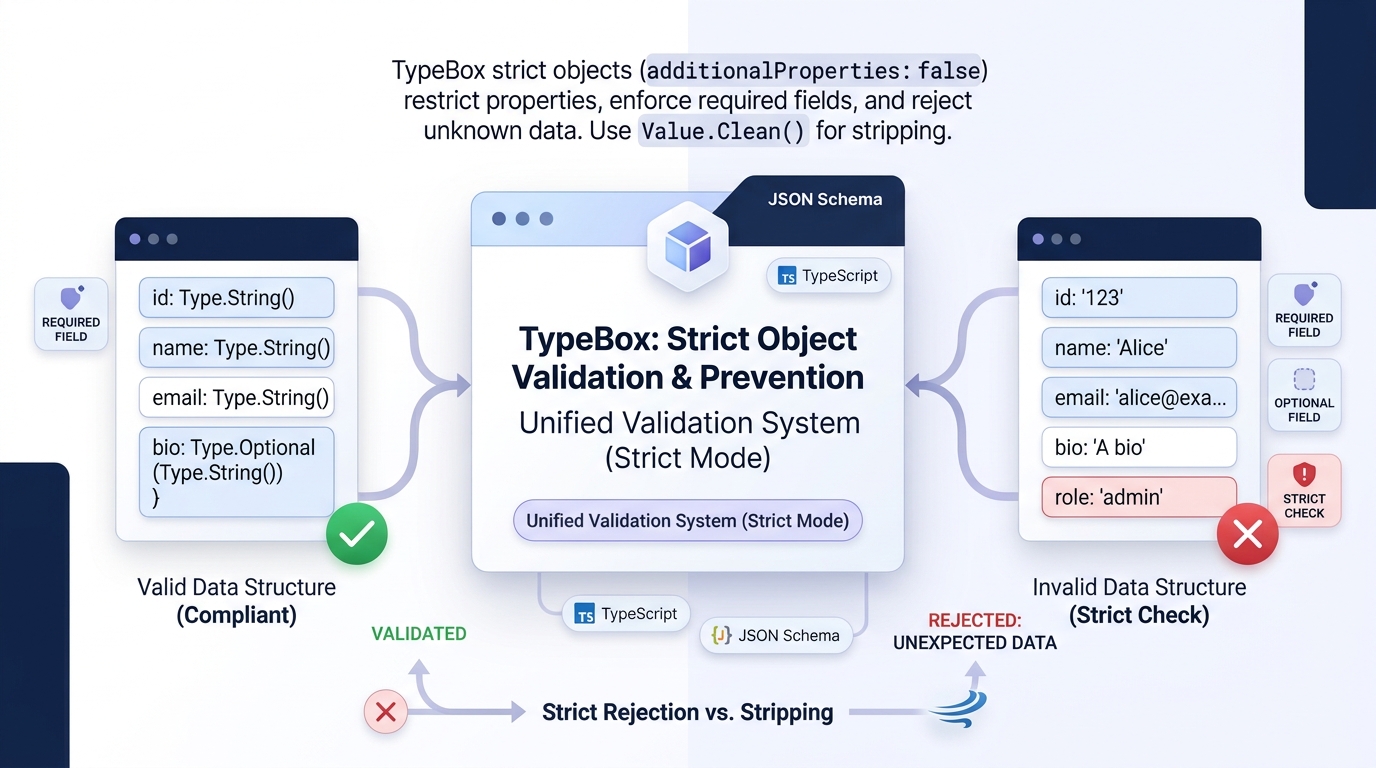
    By default, nothing dramatic: the data still passes. TypeBox additional properties are the fields that arrive in an object even though the schema never mentioned them, and unless you deliberately restrict them, validation accepts the object and the extra fields simply ride along untouched. They are not checked, not converted and not removed.

    Only when a schema is configured to forbid additional properties does their presence turn into a validation failure. That default surprises many developers the first time they meet it, because a schema feels like it should be a complete description of what an object may contain. In JSON Schema, however, an object schema describes the fields it cares about and stays silent about the rest, and TypeBox follows that convention.

    Whether silence is the right choice for your project is a design decision. This article explains what counts as an additional property, what happens in each configuration, and how to choose strictness deliberately.

    What Counts as an Additional Property in an Object Schema

    An additional property is any key in the data that the object schema does not declare. If a schema describes a user as having a name and an email, then an incoming object carrying a nickname, a legacy identifier or a debugging flag has three declared-or-undeclared parts: the two known fields, and everything else, which falls into the additional category.

    The category is about names, not values. An undeclared field counts as additional no matter what it holds, whether that is a harmless string or an entire nested object.

    Keeping Two Failure Kinds Separate

    Conversely, a declared field with a bad value is not an additional property problem at all; it is an ordinary validation failure on a known field. Keeping those two failure kinds separate makes error reports much easier to reason about.

    Why Extra Fields Appear in Real Systems

    Additional properties appear for mundane reasons. Producers add fields before consumers update their schemas. Older clients keep sending retired fields long after a redesign.

    Intermediaries attach metadata of their own. None of this implies malice or even carelessness; it is the normal friction of systems that evolve at different speeds, and it is why TypeBox, like JSON Schema generally, treats tolerance as the sensible starting point.

    Additional Is Not the Same as Missing

    It is also worth separating additional properties from missing ones. A schema can be relaxed about extras while remaining firm about required fields, and the two settings pull in opposite directions: one governs what may arrive uninvited, the other governs what must always show up.

    The Default Behaviour When Extra Fields Appear in Data

    Under the default configuration, validation looks the other way. The validator checks every declared field against its rules and ignores the rest of the object entirely. An object with the right name and email plus four undeclared fields validates exactly as cleanly as the same object with nothing extra.

    The extra fields are also left physically untouched. They remain in the object after validation, available to any later code that happens to look for them, and they will be serialised along with everything else if the object is sent onward. This pass-through quality is why tolerant schemas are popular at system boundaries that aggregate data from several sources: nothing is silently destroyed on the way through.

    What Tolerance Means for Stored Data

    There is a subtle consequence for teams that store validated data. Whatever extra fields arrived are what gets stored, including fields nobody on the team recognises.

    Over time, stored objects accumulate historical extras like sediment. That is rarely an emergency, but it explains the mysterious legacy keys that surface whenever someone finally inspects the database with fresh eyes.

    Why the Default Optimises for Interoperability

    The default, in short, optimises for interoperability. Producers and consumers can evolve independently, minor version differences stop being breaking changes, and the schema enforces the contract it actually cares about rather than policing everything that travels with the data.

    How Validation Results Change When Additional Properties Are Restricted

    Restricting additional properties flips the validator’s posture from tolerance to gatekeeping. With the restriction switched on for an object schema, the presence of any undeclared key fails validation, even when every declared field is perfectly valid. The error identifies the offending property, so the sender can see exactly which field the schema refused to accept.

    This is a stronger contract, and it changes the failure profile of a system. Requests that previously sailed through now fail because a client sent a field the schema does not know. During development that strictness is valuable: typos in field names, which tolerant validation would let slip through as silent extras while the intended field stayed missing, are caught immediately and noisily.

    Selective Strictness and the Removal Alternative

    Strictness can also be applied selectively. A schema language that treats each object independently lets you forbid extras on sensitive objects while leaving aggregating or forwarding objects tolerant. Nested objects make their own choices too, so a strict outer record can contain a deliberately open inner one, such as a metadata bag whose whole purpose is to carry arbitrary extras.

    A related middle path is removal rather than rejection. Some teams prefer tooling that strips undeclared fields during or after validation, keeping the data that matters and discarding the rest. That approach suits stored data and forwarded messages, though it should be a deliberate pipeline step rather than a surprise, because silently discarding fields that another system expected can move the bug rather than fix it.

    How Extra Fields Affect the TypeScript Side of the Schema

    On the static side, the generated type describes the declared fields and says nothing about extras, which creates an asymmetry worth understanding. At runtime an object may carry additional properties; in the type system, those properties are invisible. Code reading validated data through its type sees exactly the declared shape and nothing more.

    TypeScript’s own behaviour adds a wrinkle. The language performs excess property checks on fresh object literals, so hand-written data assigned directly in code can be flagged for extra fields even while identical data arriving from outside passes validation without comment. Developers occasionally find this backwards, strict where they write data and relaxed where they receive it, but each behaviour guards a different moment: literals are checked at authoring time, external data at the boundary.

    The Practical Consequence for Trusting Your Data

    The practical consequence is about trust. Code that needs a field should not assume it can fish undeclared extras out of validated data in a type-safe way, because the type does not know they exist.

    If a field matters, declare it in the schema, possibly as optional. That is also the correct response when a supposedly extra field turns out to be load-bearing in production: promote it into the contract, where both the validator and the types can see it. Questions about declared-but-absent fields belong to the neighbouring topic of what happens when an optional property is missing, which pairs naturally with the strictness decision.

    Deciding Strictness for APIs That Receive Outside Data

    For public APIs and webhooks, tolerance is usually the safer default. Senders include partner systems, older mobile apps and third-party tools you do not control. Rejecting their requests over an extra field they consider harmless creates integration failures that are hard to debug from the other side, and the sender often cannot change quickly even when they want to.

    Strictness earns its keep in narrower settings. Internal messages between services owned by one team benefit from loud failures, because both sides can be fixed in the same afternoon. Security-sensitive payloads are another candidate: when an object drives permissions, pricing or identity, accepting undeclared fields creates room for confusion about which fields actually influenced a decision, and a strict schema removes that ambiguity.

    A Layered Policy Many Teams Adopt

    A workable policy many teams adopt is layered. The public boundary stays tolerant so integrations do not shatter, while the objects that drive internal decisions are strict. Whichever you choose, document it per schema rather than by habit, because the next developer will otherwise assume the opposite of what you intended.

    When to Revisit the Choice

    Revisit the choice when the data changes owners. A schema written for an internal tool that later becomes a partner-facing contract should usually loosen; a tolerant prototype that hardens into a payment flow should usually tighten.

    Strictness is not a personality trait of the codebase. It is a per-boundary decision about who sends the data and what a surprise field could cost.

    Frequently Asked Questions

    Does TypeBox reject extra fields by default?

    No. Following JSON Schema convention, extra fields are allowed by default and pass through validation untouched. Rejection happens only when the object schema is configured to restrict additional properties.

    Are additional properties removed during validation?

    Not by the validator itself. Extra fields stay in the object after a successful check. Removing them is a separate, deliberate step some teams add to their pipeline.

    Can I forbid extra fields on one object but allow them on another?

    Yes. The setting belongs to each object schema individually, including nested objects, so strict and tolerant shapes can be mixed within a single larger schema.

    Do extra fields appear in the generated TypeScript type?

    No. The generated type contains only the declared fields. Extras may exist at runtime, but code cannot access them in a type-safe way unless they are declared in the schema.

    Conclusion

    When a TypeBox schema contains additional properties in the data it receives, the default outcome is calm acceptance: declared fields are checked, extras are ignored and left in place. Restricting them turns the same situation into a clear validation failure, which protects sensitive contracts and catches naming mistakes early.

    The generated types only ever describe declared fields, so anything that matters should be written into the schema. Choose tolerance at open boundaries and strictness where surprises are expensive, and the behaviour stops being a surprise itself.

  • Can TypeBox handle binary data or buffer-based values?

    Can TypeBox handle binary data or buffer-based values?

    Yes, with a clear understanding of where the boundaries are. TypeBox binary data support exists because real applications deal with more than text and numbers: file contents, images, cryptographic material and encoded payloads all travel as bytes. TypeBox includes dedicated types for byte-based values, so a schema can describe a field as binary, generate a matching TypeScript type, and check the value properly when it is validated in memory.

    The boundary is JSON itself. Binary values do not survive a trip through plain JSON, so when data has to cross a JSON boundary it is normally converted to text first, most often base64, and the schema describes that text instead. Knowing which side of that boundary your data sits on is the whole trick, and this article explains how TypeBox represents binary values, what the types look like, and how validation treats them.

    Why Binary Data Does Not Fit the Usual JSON Shapes

    JSON was designed around a small set of shapes: text, numbers, true and false, lists, and objects made of named fields. A sequence of raw bytes is none of those.

    Bytes can hold any value from zero to 255, including many that have no printable character and no safe representation as ordinary text. Forcing them into a JSON string corrupts them or inflates them beyond recognition.

    Why an Array of Numbers Does Not Work

    The naive workaround is an array of numbers, one per byte. It is technically valid and practically miserable.

    A modest image becomes hundreds of thousands of array entries, the payload balloons in size, and every consumer has to rebuild the original bytes before doing anything useful. Nobody who has watched a network tab fill with numbers does this twice.

    The Two Honest Options

    So the ecosystem settled on two honest options. Inside a running program, bytes are bytes, held in a buffer-like container and handled as a single value.

    Across a JSON boundary, bytes are encoded as text, usually base64, which trades a size increase of roughly a third for safe transport through any JSON channel. A schema library has to serve both worlds, and that is exactly the split you will see in how TypeBox approaches the problem: real binary types for values in memory, and ordinary string schemas for encoded values on the wire.

    How TypeBox Represents Buffer-Based Values in a Schema

    TypeBox treats binary as a first-class category alongside its other built-in types. Rather than pretending a buffer is an array of numbers, it provides dedicated schema builders for byte array values and for the underlying buffer containers that hold them. A field declared with one of these builders is described as a binary value in its own right, with its own identity in the schema.

    This matters because the description stays truthful. A reader of the schema can see immediately that the field carries file contents or raw bytes, not a list of small integers.

    Size Expectations and Exported Schemas

    Tooling that consumes the schema sees the same thing. The schema can also express expectations about the value, such as size limits, in the same spirit as length limits on text or item limits on arrays, which is useful when a field is supposed to hold a small thumbnail rather than an unbounded upload.

    There is an important nuance when schemas are exported as pure JSON Schema documents. JSON Schema has no native binary shape, so exported descriptions lean on conventions: encoded content is usually described as text with a declared format, while the in-memory binary types rely on the validator understanding what a byte array instance is. Teams that share schemas with non-TypeScript tools should decide early which convention they are using, so the contract means the same thing on both sides.

    Binary Fields Inside Ordinary Records

    None of this changes the shape of the surrounding schema. A record can mix ordinary fields, a name here and a size there, with one or two binary fields where the actual content lives. Composition works as usual, and binary fields can sit inside optional properties, arrays of records and the rest of the normal toolkit.

    What the Generated TypeScript Type Looks Like for Binary Fields

    The static type generated for a binary field is the natural TypeScript counterpart: a byte array type for buffer-based values, and the buffer container type where the schema describes a whole buffer. In practice this means code that consumes validated data can treat the field as bytes immediately, passing it to file writers, hashing functions, image processors and network calls without any conversion ceremony.

    This is a noticeable quality-of-life difference from the encoded-text approach. When binary travels as base64 text, the static type is just a string, and nothing in the type tells the reader that the string represents bytes, which encoding it uses, or that it should be decoded before use.

    How the Two Styles Compose

    Every consumer has to know the convention by heart. With a true binary type, the type itself carries that information, and misuse, like accidentally displaying raw bytes as text, becomes easier to spot in review.

    The two styles also compose differently. A schema describing an upload record with a binary content field produces a record type whose content field is bytes and whose metadata fields are ordinary text and numbers. TypeScript developers reading that type understand the whole arrangement at a glance, which is the same readability benefit TypeBox aims for everywhere else.

    The Caution at the JSON Boundary

    One caution is worth repeating: the elegant in-memory type only exists while the data stays in memory. The moment the same record is serialised to JSON for storage or transport, the binary field needs an encoding step, and the type on the receiving side is whatever that side’s schema says it is. Keeping the two representations clearly named in a codebase prevents a whole category of confusion.

    How Validation Treats Binary Values at Runtime

    Runtime validation of a binary field is an identity check rather than a content inspection. The validator confirms that the value actually is a byte array or buffer of the expected kind, rather than, say, a string that merely looks like one.

    If size expectations were declared in the schema, those are checked as well. The contents of the bytes are not interpreted; a schema cannot tell a valid image from random noise, only that the value is genuinely binary and the right sort of size.

    What the Schema Cannot Judge

    That distinction shapes how you should design checks around uploads. The schema layer answers “is this really bytes, and is it within the allowed size”, while format-specific verification, such as confirming an image header or a file signature, belongs in ordinary code after validation. Expecting the schema to judge content is a category error that leads to disappointment.

    Performance and the Encoded-Text Case

    Performance is generally a non-issue for binary fields, because checking a value’s kind and length is cheap compared with walking a large object field by field. Teams wondering about the overall cost of checking large payloads on every request are really asking whether validation slows a busy API down, which depends far more on object size and schema complexity than on the presence of a binary field or two.

    Encoded values behave differently, of course. A base64 field validates as a string, so the schema can check its length and pattern but cannot confirm the decoded bytes are meaningful until code decodes them. If the distinction matters to your application, validate the text at the boundary, decode it, and then treat the result as binary data inside.

    Practical Places Binary Fields Appear, Such as File Uploads

    File uploads are the everyday case. A user submits a photo, a document or an attachment, and the receiving code holds the contents as bytes long before anything is stored. A schema with a binary field describes that payload honestly: the content is bytes, the filename is text, the size is a number, and each part validates according to its own nature.

    Generated and derived files form a second case. Systems that produce PDFs, export spreadsheets or render images end up holding the results as buffers before sending or saving them. Describing those results with binary fields keeps internal message shapes truthful as they move between services in the same process or across a direct binary channel.

    Security Material and the Hybrid Pattern

    Cryptographic and identity material is a third case. Hashes, signatures, keys and tokens at the byte level are all binary values, even when they are short. Schemas for security-sensitive messages benefit from saying so explicitly, because a hash described as bytes cannot be quietly confused with the human-readable text it might be printed as.

    Finally, there is the hybrid pattern most APIs actually use. Bytes cross the network encoded as text, then are decoded and handled as binary inside. A well-kept codebase marks the boundary clearly: the external schema describes the encoded text, the internal schema describes the binary value, and one deliberate conversion step connects them.

    Frequently Asked Questions

    Can a TypeBox schema describe a file upload directly?

    Yes, when the upload is handled in memory. The content field can be declared as binary alongside text fields for the filename and other metadata, and each part validates according to its kind.

    Does binary data survive being sent as JSON?

    No. JSON has no binary shape, so bytes are encoded as text, usually base64, before transport and described as a string in the schema on that side of the boundary.

    Can validation check that binary data is a valid image?

    Not at the schema level. Validation confirms the value is genuinely bytes and within any declared size expectations. Checking image headers or file signatures belongs in code after validation.

    What type does a binary field produce in TypeScript?

    A byte array or buffer type. It matches how the value is actually used in code, so consumers can pass it straight to file, hashing and network operations.

    Conclusion

    TypeBox handles binary data and buffer-based values as first-class citizens inside a running program: dedicated schema types describe them truthfully, the generated TypeScript types treat them as bytes, and validation checks their kind and size quickly. Across JSON boundaries the same data travels as encoded text under a string schema. Keep those two worlds clearly separated in your schemas, and binary fields stop being a special case and become just another well-described part of your data.

  • How does TypeBox manage schema references across multiple files?

    How does TypeBox manage schema references across multiple files?

    TypeBox schema references solve the problem every growing project eventually meets: the same definitions copied into file after file until nobody dares to change any of them. Instead of repeating a shared shape everywhere it is needed, you define it once and point to it from each place that uses it. The pointer is a reference, and when validation runs, the reference is followed and the shared definition does the checking.

    The short answer, then, is that TypeBox manages references the way JSON Schema does, with one important addition. Because schemas in TypeBox are ordinary values built in TypeScript code, a reference is usually just an import: one module defines the schema, other modules import it and embed it or point to it by its identity.

    The generated types stay connected too, so a change to the shared definition flows through to every type derived from it. This article looks at why files get split in the first place, how references actually work, and the habits that keep a referenced schema collection maintainable.

    Why Long Schemas Get Split Across Files

    Small projects rarely need references. A handful of schemas in one file is easy to scan, and duplication is too minor to matter. The pressure arrives with success: more endpoints, more message types, more shared building blocks like addresses, money amounts, pagination shapes and user summaries that appear in dozens of places.

    Duplication is the expensive part. When the address shape lives in nine files, a change to addresses means nine careful edits, and the tenth copy someone forgot becomes a bug that surfaces weeks later.

    Keeping Shared Definitions in Step

    Worse, the copies drift. One team adds a field in their copy, another tightens a rule in theirs, and soon the same concept means different things in different parts of the system.

    Splitting schemas into modules mirrors how the rest of the codebase is already organised. Domain concepts get their own files, shared primitives live in a common module, and each feature imports what it needs. References are the mechanism that lets those modules point at each other instead of copying each other, and they are the foundation that makes larger patterns practical, such as representing complex conditional requirements in one shared place rather than re-describing the same conditions in every file that needs them.

    How a Reference Points to a Schema Defined Elsewhere

    A reference works by identity rather than by copying content. The shared schema is given a stable identifier, and other schemas mention that identifier wherever the shared shape should apply. At validation time, the reference is resolved: the validator looks up the definition behind the identifier and applies it at that point, exactly as if the definition had been written inline.

    In TypeBox, two styles sit side by side. The simplest is plain composition through code: import the shared schema object and use it directly as a property or as part of a larger schema.

    Formal References for Shared Contracts

    Because schemas are values, this feels like ordinary programming, and TypeScript tracks the relationship for you. The second style is the formal JSON Schema reference, the well-known dollar-ref pointer, which names a definition by its identifier and is what you see when schemas are exported, stored or exchanged as documents.

    Both styles answer the same need, and real projects often mix them. Inside one codebase, direct imports are convenient and refactor-friendly.

    One Principle Behind Both Styles

    Across service boundaries, or when schemas are published for other teams and tools, identifier-based references keep the contract explicit. Either way, the principle is identical: define once, point often, and let resolution do the rest.

    What Happens to the Generated Type When Schemas Are Referenced

    The generated TypeScript types follow the same structure as the schemas. A shared definition produces one shared type, and every schema that references it ends up using that same type in the corresponding position. An address schema referenced by both an order and an invoice yields one address type shared by the order type and the invoice type, not two lookalike types that happen to match today.

    This has a quietly powerful effect on refactoring. Rename a field in the shared schema and the type errors appear in every consuming file at once, pointing at exactly the code that assumed the old shape. Compare that with the duplicated-schema world, where a rename in one copy compiles happily while three stale copies keep accepting the old data.

    Recursive Shapes and Their Limits

    References also make recursive and mutually connected shapes manageable. A category that contains subcategories, or a comment that contains replies, describes itself in terms of itself. With references, the generated type is recursive in the same way, which matches how the data actually behaves.

    There are limits worth knowing about: extremely deep reference chains can make type displays unwieldy in editor tooltips, and circular arrangements occasionally need care so that type inference settles. In everyday projects these are minor frictions rather than blockers.

    Two Views of One Definition

    It is worth remembering what TypeBox is doing underneath all of this. The reference structure exists in the schema itself, so the runtime validator and the static types are reading two views of one definition, which is why they stay in step when the definition changes.

    How References Are Resolved During Validation

    Resolution is the lookup step that turns a pointer into the rules it names. When a validator reaches a reference, it pauses, finds the definition registered under that identifier, and applies that definition to the current value. If the referenced schema itself contains references, those are followed in turn, so resolution can walk a whole chain of shared definitions during a single validation.

    For this to work, the referenced definitions must be known to the validator. In practice that means the shared schemas are gathered and registered, either by passing the related schemas together when validation is set up or by compiling them into one combined view. Most surprises in this area come from a simple mismatch: a schema refers to an identifier that was never registered, and validation fails with an unknown reference complaint rather than a data error.

    What Resolution Means for Performance and Sharing

    Performance is rarely a concern. Validators resolve references once during setup or compilation and then reuse the resolved structure, so the cost is paid up front rather than on every value checked. Deeply chained references add a little setup work, but they do not change the cost of validating each message in any way you are likely to notice.

    Resolution also explains why referenced schemas are such a reliable sharing mechanism across files. The file boundaries disappear after registration. What the validator sees is one connected schema graph, regardless of how many modules contributed the pieces.

    Habits That Keep Referenced Schemas Easy to Maintain

    The first habit is ownership. Every shared schema should have an obvious home and an obvious owner, so a developer who needs to change it knows where it lives and what else might be affected. A common layout keeps genuinely universal shapes, like money and addresses, in one shared module, while feature-specific shapes live with their feature and are only promoted to shared status when a second feature truly needs them.

    Naming deserves the same care as ownership. Identifiers are the contract that references depend on, so they should be stable, descriptive and treated as hard to change. Renaming a shared schema is closer to renaming a public endpoint than to tidying a local variable, because every reference in every file points at that name.

    Shallow Chains and Tested Definitions

    Keep reference chains shallow. A schema that references a schema that references another schema is legal, but each extra hop makes the effective rules harder to reconstruct in your head. Where a chain exists only to rename something, consider referencing the original definition directly and keeping the alias purely as a type in code.

    Finally, test the shared schemas as the shared assets they are. A small suite that validates known-good and known-bad values against each shared definition catches breakage at the source, before a change ripples into every consumer. When a shared schema must evolve, versioning it or adding the new shape alongside the old one is far safer than silently changing what an existing identifier means.

    Frequently Asked Questions

    Do I need formal references, or are imports enough?

    Inside one TypeScript codebase, importing schema values and composing them directly covers most needs. Formal identifier-based references matter when schemas are exported, stored, published or shared with other tools and services.

    What happens if a referenced schema is missing at validation time?

    Validation fails with an unknown reference error, because the validator cannot resolve the pointer. Registering all shared definitions during setup prevents this.

    Can a schema reference itself?

    Yes. Recursive data such as nested categories or threaded comments is expressed with a schema that references itself, and the generated type is recursive in the same way.

    Does changing a shared schema update every type automatically?

    It does. Because consuming types are derived from the single shared definition, a change flows through everywhere, and TypeScript highlights the code that relied on the old shape.

    Conclusion

    TypeBox schema references manage multi-file projects by identity instead of duplication: define a shape once, give it a stable identifier, and let other schemas point to it through imports or formal references. Resolution connects everything into one graph at validation time, the generated types stay shared and refactor-safe, and a few habits around ownership, naming and testing keep the whole structure pleasant to maintain as it grows.

  • Can TypeBox represent complex conditional data requirements?

    Can TypeBox represent complex conditional data requirements?

    Yes. TypeBox conditional schemas exist for exactly this situation: data where the rules change depending on the values inside the data itself. A field that becomes required only when another field holds a certain value, a property that must appear when a status changes, or a record whose shape differs between account types can all be described in one schema.

    None of this is a TypeBox invention. The conditions come from JSON Schema, and TypeBox exposes them as ordinary building blocks that still generate a TypeScript type. The honest answer does come with a boundary.

    Simple and moderately complex conditions work well and stay readable for the people who maintain them. Very tangled business rules, where one requirement depends on three fields and a calculation, are usually better handled by a plain validation step that runs after the schema check. The rest of this article walks through what conditional requirements look like in practice, how TypeBox expresses them, and where the limits sit.

    What a Conditional Data Requirement Looks Like in Practice

    A conditional requirement is any rule you cannot state as a simple property of one field. Saying a name must be a string is unconditional.

    Saying a company name must be present whenever the account type is set to business is conditional, because whether the rule applies depends on another value in the same object. That distinction sounds small, but it shows up in almost every real system.

    Conditions in Checkout Forms

    Checkout forms are a classic home for conditions. A delivery address is required when the customer chooses delivery, and pointless when they choose collection.

    Payment details change shape depending on the payment method selected. A discount code field might be optional in general, yet need a matching reason field whenever it is used.

    Conditions in APIs and Larger Systems

    APIs produce the same pattern at a larger scale. A subscription object may carry renewal settings only for paid plans, while free plans must not send them at all.

    A report request might allow a custom date range only when the report type is set to custom, and fixed ranges otherwise. In each case, the validity of one field is decided by the content of another, which is precisely what TypeBox is built to model: one definition that describes the data and produces the type your code works with.

    The Negative Form of a Condition

    Conditions also appear in a negative form. Sometimes a field is forbidden unless something else is true, such as an approval note that may only exist once a request has been reviewed. Expressing both directions, required-when and forbidden-unless, is what turns a loose object description into a real data contract.

    The JSON Schema Patterns TypeBox Uses to Express Conditions

    TypeBox conditional schemas rest on a small set of JSON Schema patterns rather than on any special TypeBox-only machinery. The best known is the if, then and else arrangement.

    The schema first tests the data against a condition, much like a guard clause. When the data matches the condition, the rules in the then branch apply; when it does not, the else branch applies instead.

    Dependent Properties

    A second pattern covers dependent properties. Instead of testing values, it simply states that the presence of one property requires the presence of another.

    This suits the company name example well, because the rule is about fields travelling together rather than about any particular value. For richer cases, schemas can also demand that a whole sub-schema holds whenever a flag field equals a given value.

    Composition for Bigger Requirements

    Composition does the heavy lifting for anything bigger. Conditions are combined with the same tools used everywhere else in JSON Schema: a value must match one of several complete shapes, or it must satisfy several partial schemas at once.

    A common technique is to describe each variant of a record as its own complete shape and then say the data must match exactly one of them. The payment method example maps neatly onto this approach, with card, transfer and wallet each described in full.

    Why Standard Patterns Travel Well

    Because these are standard patterns, they travel well. A schema written for TypeScript validation can be shared with other tools that understand JSON Schema, and other developers reading it will recognise the conditional structure even if they have never used TypeBox. That portability is a practical advantage when schemas are shared between a frontend, a backend and partner systems.

    How Conditions Affect the TypeScript Type You Get Back

    The static type produced from a conditional schema is best thought of as an honest summary rather than a perfect mirror. When a record can take several shapes, the generated type becomes a union of those shapes. Your code then sees one type that could be the card variant or the transfer variant, and TypeScript pushes you to check which one you are holding before using variant-specific fields.

    This works especially well when the variants are separated by a tag field, such as a method or kind property with a fixed set of values. TypeScript can narrow a union by that tag, so inside a branch that checks the tag, the correct fields become available and the others are excluded. Well-designed conditional schemas lean on this behaviour deliberately, because it makes the runtime rules and the static types tell the same story.

    Where the Type Cannot Tell the Whole Story

    Value-dependent rules are harder for the type system. A rule like “the company name is required when the account type is business” cannot be fully captured as a static type without contortions, because it ties the presence of one field to the runtime value of another.

    The generated type will usually mark such fields as optional, and the schema carries the real enforcement at validation time. That split is normal and worth understanding: the type keeps your code convenient, while the schema remains the strict authority.

    How Unlisted Data Interacts With Conditions

    It also helps to know how unlisted data interacts with all of this. Strictness settings decide what extra properties do to a schema when incoming objects carry fields the schema never mentioned, and those settings apply whether or not the object also uses conditional rules.

    How Validation Behaves When a Condition Is Triggered

    At runtime, validation reads the actual data and follows the conditions wherever they lead. When the incoming object says the account type is business, the validator checks the branch that applies to businesses, including its extra required fields. When the type is personal, that branch is skipped entirely, and a missing company name is not treated as a problem.

    This selective checking is the real payoff of TypeBox conditional schemas. One schema can accept several legitimate shapes while still rejecting broken ones, such as a business account with no company name or a delivery order with no address. Without conditions, teams usually end up with one loose schema plus scattered manual checks, and the manual checks are the part that quietly drifts out of date.

    What Error Messages Look Like When a Branch Fails

    Error reporting follows the branch that failed. If a condition is triggered and its required field is missing, the error points at the missing field within that branch.

    In deeply nested conditions the messages can take some untangling, which is another reason to keep conditions as shallow as the data allows. A failing else branch can be particularly confusing to read, because the error describes a rule the reader may not have expected to apply.

    Where Conditional Logic Becomes Too Complex for a Schema

    Schemas are declarative, and that strength becomes a ceiling when the rule stops being about shape. A requirement that a total must equal the sum of its line items involves arithmetic across fields.

    A rule that a coupon is valid only while a campaign is running depends on outside data and the current time. A rule that changes with the user’s history depends on state the schema never sees.

    Nested Conditions as a Warning Sign

    Nested conditions are the other warning sign. One level of branching is easy to read; three levels of if and else, combined with several alternative shapes, produces a schema nobody wants to review. At that point the schema is functioning as a small program written in a language with no debugging tools, and bugs hide in it comfortably.

    The Two-Layer Approach

    The practical pattern is a two-layer approach. Let the schema enforce structure and the conditions it expresses cleanly, then run ordinary code checks for the genuinely computational rules. TypeBox does not object to this division of labour; the schema still guards every boundary, and the code layer handles the handful of rules that were never really about shape.

    Frequently Asked Questions

    Can TypeBox require a field only when another field has a specific value?

    Yes. That is the most common conditional requirement, and it is expressed with the standard if and then pattern: test the deciding field, and apply the extra requirement only when the test matches.

    Do conditional schemas still produce a TypeScript type?

    They do. Variant-based conditions produce union types that TypeScript can narrow by a tag field. Purely value-dependent requirements are enforced at validation time, with the affected fields usually appearing as optional in the static type.

    Can conditions be nested inside other conditions?

    They can, but deep nesting quickly becomes hard to read and hard to debug. If a rule needs several levels of branching, it is often a sign that part of the check belongs in ordinary code after validation.

    Are TypeBox conditional schemas portable to other tools?

    Mostly, yes. The conditions use standard JSON Schema patterns, so other validators that support those parts of the specification can read the same schema.

    Conclusion

    TypeBox conditional schemas comfortably represent the conditional requirements that appear in real forms, APIs and configuration data: fields that travel together, shapes that change with a tag value, and branches that apply only when a condition matches. The type you get back is a useful union or an approximation, while validation enforces the details. For rules involving arithmetic, outside data or deep branching, pair the schema with a small code check and you get the best of both layers.

  • Is it possible to define strict object properties using TypeBox?

    Is it possible to define strict object properties using TypeBox?

    Yes, TypeBox allows developers to define strict object properties by controlling whether additional properties are accepted during validation. This makes it possible to restrict an object to predefined fields and reject unexpected properties that do not belong to its schema.

    TypeBox strict objects are useful when applications need predictable data structures, reliable API validation, and better control over incoming information. By combining defined properties, required fields, and additional property restrictions, developers can create object schemas that maintain consistent data formats across their applications.

    How TypeBox Defines Strict Objects

    TypeBox defines object structures through Type.Object, allowing developers to specify which properties an object can contain. Each property can have its own data type and validation requirements, giving developers control over the expected structure of incoming data.

    To make an object strict, developers can configure its additional property behavior. This allows the schema to distinguish between predefined properties and unexpected fields, helping applications maintain consistent object structures during runtime validation.

    Preventing Additional Properties in TypeBox

    TypeBox supports restricting additional properties through the additionalProperties setting. When this setting is disabled, an object can contain only the properties explicitly defined in its schema, and unexpected fields fail validation.

    This is particularly useful for API requests and configuration objects where accepting unknown properties could create inconsistent data. Strict validation ensures that incoming objects follow the expected structure instead of silently accepting fields that the application does not recognize.

    Difference Between Required and Optional Properties

    Required and optional properties determine whether a field must exist inside an object. TypeBox treats these requirements separately from additional property restrictions, allowing developers to control both field presence and the overall object structure.

    A required property must be included for the object to pass validation, while an optional property can be omitted without making the object invalid. However, optional properties must still follow their defined data types when provided, and strict object settings can prevent unrelated fields from being accepted.

    How TypeBox Validates Object Properties

    TypeBox validates object properties by checking incoming values against the rules defined in the schema. These rules can include data types, required fields, string constraints, numeric limits, and other supported validation conditions.

    During runtime validation, the object must satisfy the applicable property requirements and additional property restrictions. This helps developers ensure that incoming data follows the expected structure before it is used by application logic or passed to other services.

    Handling Unexpected Properties During Validation

    Unexpected properties are fields that appear in an object but are not included in its schema definition. In a strict TypeBox object, these fields are rejected when additional properties are disabled, preventing unrecognized information from passing validation.

    This behavior is important when working with external API requests, user-submitted data, and application settings. Rejecting unexpected properties makes data structures more predictable and helps developers identify incorrect or unsupported fields before they affect application behavior.

    Common Use Cases for Strict Object Schemas

    Strict object schemas are useful whenever an application requires a clearly defined data format. They help developers maintain consistent structures across different application components and reduce the possibility of unexpected fields entering important workflows.

    Common use cases include:

    • API request validation: Accept only supported request properties.
    • User registration: Restrict submitted fields to approved account information.
    • Configuration objects: Prevent unknown settings from being accepted.
    • Database operations: Validate object structures before processing data.
    • Authentication systems: Control which properties are accepted in authentication requests.
    • Data exchange: Maintain predictable object formats between services.

    Best Practices for Defining Strict Objects

    When creating strict TypeBox schemas, developers should define only the properties required by their application and apply appropriate validation rules to each field. Required and optional properties should be selected carefully so that the schema reflects the actual data structure rather than rejecting legitimate input.

    It is also important to consider how strict validation affects nested objects and composed schemas. Each object level may need its own additional property restrictions, depending on the intended structure. Reviewing these rules helps prevent unexpected fields while keeping schema validation consistent and maintainable.

    Conclusion

    TypeBox makes it possible to define strict object properties by controlling additional property acceptance within object schemas. Developers can specify allowed fields, enforce required properties, and reject unexpected data during runtime validation. Using TypeBox strict objects helps maintain predictable data structures, improve API request validation, and create more reliable TypeScript applications.

  • How Does TypeBox Handle Union Types With Multiple Possible Data Structures?

    How Does TypeBox Handle Union Types With Multiple Possible Data Structures?

    TypeBox handles multiple possible data structures through union types, allowing developers to define several acceptable formats within a single schema. Instead of creating separate validation systems for different object structures, developers can combine multiple schemas and let TypeBox determine whether incoming data matches at least one accepted alternative.

    TypeBox union types are particularly useful when applications handle different API responses, user roles, payment methods, or data formats. They provide flexibility while maintaining JSON Schema validation and TypeScript type safety, making it easier to manage complex data structures in modern applications.

    Read More: Can TypeBox schemas be shared between frontend and backend applications?

    How TypeBox Handles Union Types

    TypeBox supports union types through its Type.Union functionality, which combines multiple individual schemas into one definition. Each schema represents a possible data structure, and incoming data is considered valid when it satisfies at least one of the alternatives.

    This approach follows the same principle as TypeScript union types, where a value can belong to more than one possible type. TypeBox extends this functionality by providing runtime validation through JSON Schema, allowing applications to check actual data rather than relying only on development-time type information.

    Understanding Multiple Possible Data Structures

    Multiple possible data structures occur when an application accepts different formats for similar information. For example, an account management system may support customer profiles and business profiles, with each containing different properties and validation requirements.

    TypeBox allows developers to represent these alternatives without combining every possible property into one complicated object. Each structure maintains its own requirements, making the overall schema easier to understand, validate, and maintain.

    How TypeBox Validates Alternative Schemas

    TypeBox validates alternative schemas by checking whether incoming data matches at least one of the definitions included in a union. This behavior generally uses JSON Schema’s anyOf keyword, which allows multiple possible structures to be accepted through one validation definition.

    For example, a payment application might accept card payment information or bank transfer information. Each payment method has different required properties, but both can belong to the same union schema. If incoming data matches neither alternative, validation fails.

    Using Literal Values to Distinguish Object Structures

    Literal values help TypeBox distinguish between different object structures by requiring specific properties to contain predefined values. This is useful when multiple alternatives share common fields but need different identifiers to make their structures recognizable.

    For example, an application may support administrator and customer accounts. Both account types might contain a name and email address, but their role properties can contain different fixed values, helping developers identify which structure the incoming data represents.

    Understanding Discriminated Unions

    Discriminated unions use a shared identifying property to distinguish between different alternatives within a union schema. In TypeBox, developers can create this structure using object schemas and literal values, giving each alternative its own unique identifier.

    This approach makes complex data structures easier to manage because applications can determine which alternative they are handling. Discriminated unions are particularly useful for API requests, payment systems, event processing, and applications that support multiple operation types.

    Handling Different Data Types Within a Union

    TypeBox unions can combine different basic data types, including strings, numbers, booleans, and null values. This allows developers to define flexible fields that accept more than one valid type without removing their validation requirements.

    For example, an application setting might accept either a text value or a number depending on the configuration. Similarly, an optional data field may accept a string or null when information has not been provided. Union validation ensures that the supplied value matches an accepted type.

    Common Use Cases for TypeBox Union Types

    TypeBox union types are useful in applications where the same system needs to process multiple valid data formats. They allow developers to maintain separate structural requirements while providing one organized validation approach for different operations.

    Common use cases include:

    • API requests: Accept different request formats for multiple operations.
    • User accounts: Support customer, administrator, and business profiles.
    • Payment processing: Handle different payment methods and their required information.
    • Event systems: Validate multiple event structures.
    • Configuration settings: Support different value types.
    • API responses: Represent successful and error response formats.

    Important Considerations When Using Union Schemas

    Union schemas should be designed carefully to avoid overlapping structures and unnecessary complexity. When multiple alternatives share similar properties, an incoming value may match more than one schema, making it difficult for application logic to identify the intended structure.

    Using literal discriminator properties can help make alternatives more distinguishable. Developers should also define required properties carefully, manage unexpected additional fields, and organize complex schemas into reusable definitions to maintain predictable validation behavior.

    Conclusion

    TypeBox union types allow developers to validate multiple possible data structures through one flexible schema while maintaining TypeScript type safety. By combining alternative object definitions, different data types, and literal discriminator properties, applications can handle complex data formats more consistently. This makes unions particularly useful for API payloads, payment systems, user roles, and event-driven applications that require reliable runtime validation.